
Juicy: A battery app with alerts you can't ignore
Finally, battery alerts that actually make you grab your charger. Built for people who ignore low battery warnings until it's too late.
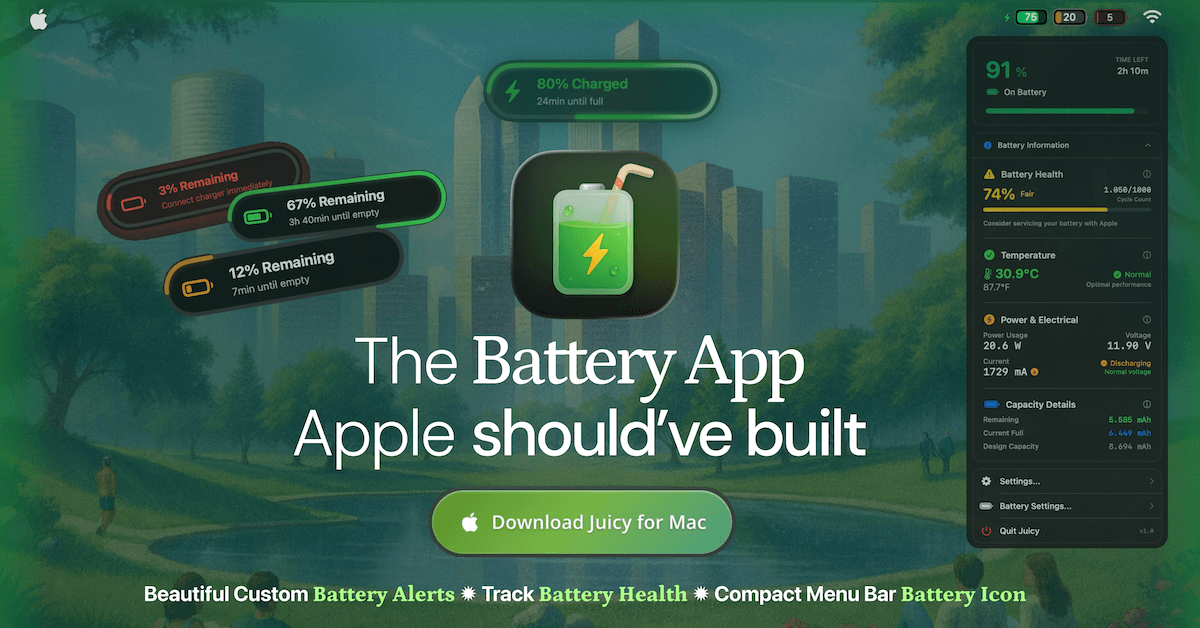
What if your Mac's battery alerts were beautiful enough to notice and annoying enough to work? That's Juicy: a native macOS app that replaces Apple's basic battery warnings with stunning, dynamic island-style notifications that bounce onto your screen with attention-grabbing sounds and visual effects. They're designed not just to inform you, but to make you actually get up and find your charging cable. No more guessing. No more sudden shutdowns.
Here's the thing: macOS only shows you alerts at 5% and 10%. That's it. Want a warning at 3% before your Mac dies? Or at 20% so you have time to find a charger? Or at 80% when you can safely unplug your charger and extend your battery lifespan? Apple says no. Juicy says yes. Set alerts at any percentage you want, with custom sounds so attention-grabbing you'll actually get up and grab your charging cable. These aren't gentle reminders you can ignore. They're designed to be annoying enough to work—in the best way possible.
But Juicy isn't just about pretty alerts. It's a complete battery management tool built from the ground up in Swift for Mac. Not an Electron wrapper, but a real native app optimized for Apple Silicon. Every pixel is designed to feel like it came with your system. You get a sleek iPhone-style battery icon in your menu bar that's far more compact than Apple's default (which takes up way too much space), with smart color indicators and percentage inside, comprehensive health tracking accessible at a glance, and alerts that actually look forward to showing you.
Made by Dominik Sobe, a indie developer who cares about quality software that's pleasant to use. Uses less than 0.1% CPU. Follows every macOS design guideline. This is what Mac battery management should have been all along.
Featured by Apple

Apps We Love
Juicy was featured by Apple on the front page of the Mac App Store under "Apps We Love" for over a month during the busiest time of year (December 2025). This recognition highlights Juicy's exceptional design, user experience, and value to the Mac community.
Why I Built This
As a digital nomad (originally Austria now traveling the world), I love squeezing the last bit of juice out of my battery when working from coffee shops, planes, cars; you name it I worked from there. More often than not those places lack power plugs and so you keep on working on your thing, ignore the default MacOS battery alerts and suddenly...
...your computer starts lagging AF (I call it the lag of death) and boom. Your battery died while you were in the middle of getting stuff done. SUPER annoying.
Now Juicy nags me so much that I either actually run for my charger at 1% or I know to wrap up my work and touch some grass 😎 I built it for myself first because I was tired of that sudden death scenario, then realized it could help others in the same boat.
Key Features
🔔 Beautiful Battery Alerts
- Set custom alerts at any battery percentage (3%, 5%, 20%, 80%, or your choice)
- Beautiful native-like notification pills that feel at home on macOS
- Screen glow effects to grab your attention
- Custom sounds for each battery event
💚 Battery Health Tracking
- Real-time health percentage monitoring
- Cycle count tracking
- Temperature warnings and voltage monitoring
- Apple service recommendations based on battery condition
🔋 Themeable Menu Bar Icon
- Compact iPhone-style battery display with percentage inside
- Sleek design that saves space in your menu bar over the default battery icon
- Smart color coding based on battery level
- Themeable icons to match your Mac's aesthetic
⚡ Lifecycle Alerts
- Notifications when charged above 80% to protect lifespan
- Alerts when unplugged or charger connected
- Custom sounds for each battery event
- Smart monitoring to extend battery longevity
📱 Multi-Device Battery Tracking
- Track AirPods, iPhone, iPad, Magic Mouse, Keyboard, Trackpad, and your Mac in one glance
- Connected devices ranked by battery level with color-coded bars
- Per-device low-battery and fully-charged alerts so nothing dies mid-call
- Unified "Now Display" for every connected device
🚫 Auto-Dismiss Notifications
- Automatically dismisses the default macOS battery pop-ups that interrupt you mid-flow
- No more manual clicking to close repeated low-battery nags
- Keeps your focus protected while Juicy handles the alerting with beautiful native-like notifications
Technical Details
- Native Swift application optimized for Apple Silicon and Intel Macs
- Requires macOS 15.0 (Sequoia) or later
- Uses less than 0.1% CPU
- Minimal memory footprint
- No cloud syncing, all data stays local
Pricing
3-day free trial, no credit card required
Direct download: $14.99/year or $24.99 lifetime (full feature set)
Mac App Store: $9.99 lifetime license, no subscription (fewer features due to App Store sandboxing)
Setapp: included with subscription (full feature set)
14-day money-back guarantee (direct download)