Custom battery alerts
at any percentage.
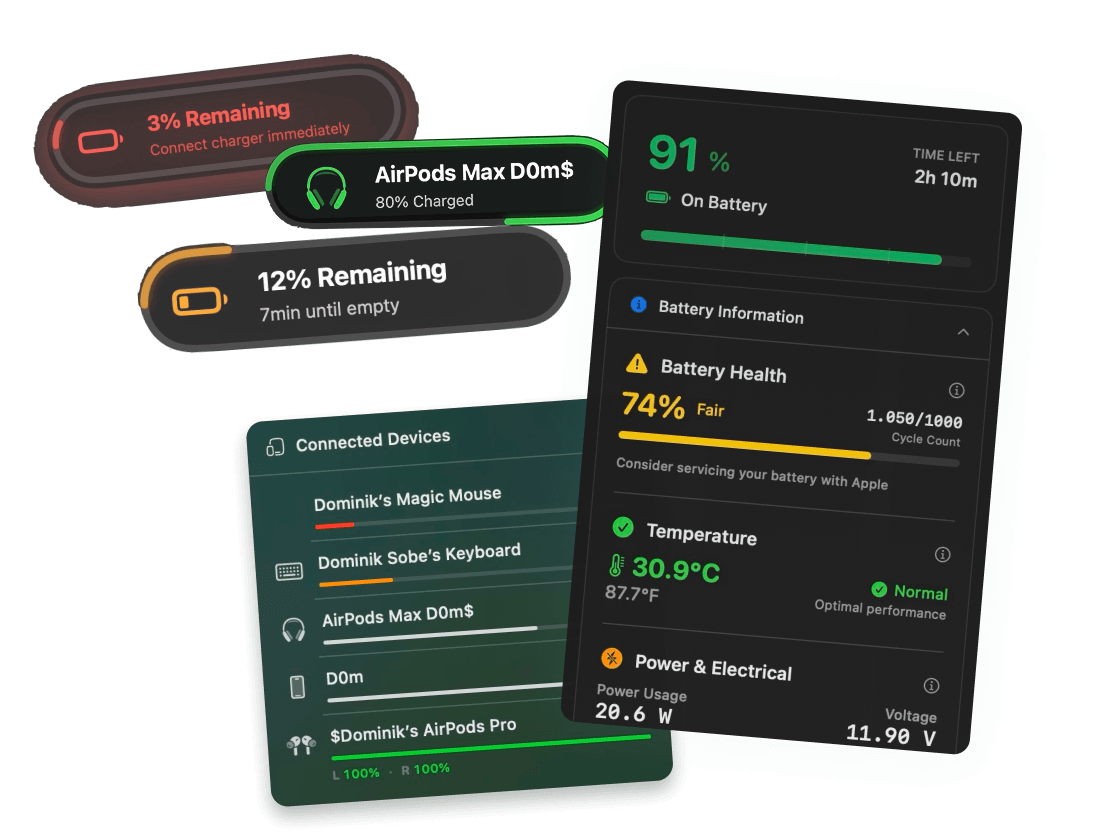
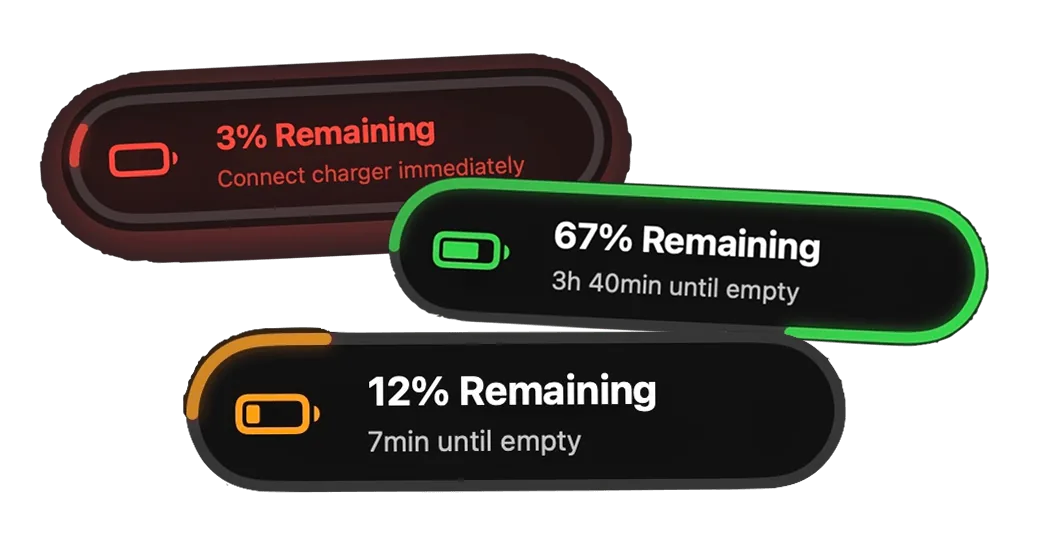
Set beautiful native-like battery notifications at 3%, 20% or 80% — or any level you choose. Screen glow effects and custom sounds included.
Free 3-day trial • No credit card required
Free 3-day trial • No credit card required
Juicy is available for your macOS
Get a download link reminder sent to your email when you are back in front of your computer:
We'll send you the download link. No spam.
Your Mac's built-in battery alerts are
limited and annoying
Apple gives you almost no control over when — or how — you're warned. Juicy puts you back in charge of every battery alert on your Mac.
Default macOS
- No way to choose when or how often you're alerted.
- No early warnings — you only find out when it's almost too late.
- No high-charge alerts at 80% to protect battery health.
- Ugly system dialog that nags you repeatedly until you plug in.
With Juicy
- Add as many custom alert thresholds as you need, at any percentage.
- Beautiful native-like notification pills that feel at home on macOS.
- Screen glow effect that pulses red so you can't miss a critical alert.
- Custom sounds per alert — pick anything from a silent chime to a loud ding.
Everything custom alerts should do
Built for every battery moment
Unlimited custom thresholds
Add alerts at any percentage from 1% to 100%. Want a warning at 47%? Go for it. Add as many custom alert levels as you need — there's no cap.
Native-feel notification pills
Beautiful pill-shaped notifications that feel at home on macOS. Designed in Swift, not Electron, so they render pixel-perfect on every Mac.
Screen glow for critical levels
When battery hits a critical threshold, your screen gently pulses red. Perfect for when you're heads-down in a meeting and silent alerts slip by.
Custom sounds per alert
Assign a different sound to each alert level. A soft chime at 20%, a loud ding at 5% — you stay informed without ever being startled.
Works on battery and charging
Alerts trigger on the way down AND on the way up. Get notified at 80% while charging so you can unplug and protect your battery lifespan.
Zero noise, zero spam
Each alert fires once per battery cycle. No more being nagged every single minute like the stock macOS low-battery dialog.
Full control
Configure every alert,
exactly how you want it
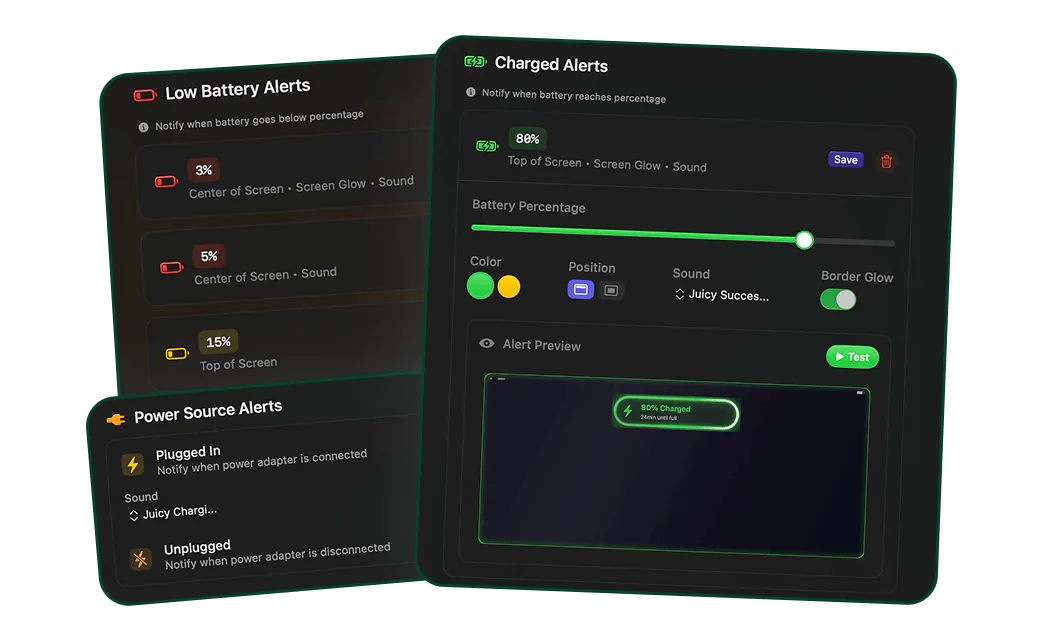
Dial in every alert from a single, clean settings panel. Pick the percentage, the sound, whether the screen should glow — it's all there, one click away.
Live demo
See custom alerts in action
Watch how Juicy delivers beautiful battery notifications — right when your Mac hits the percentages that matter to you.
The battery alerts Apple should have made!
"3 days in and Juicy has already saved me from my laptop dying while on a call. If that's not a win, I don't know what is!"
Unlock custom alerts.
Pay once, own forever.
No subscription. No hidden fees. Get custom battery alerts on your Mac for life.
Free Trial
3 days, full features
- Custom battery alerts at any %
- Battery health monitoring
- Lifecycle alerts & notifications
- No credit card required
Pro License
One-time payment
- Pay once, use forever
- One year of free updates
- Use on up to 2 Macs
- All Pro features unlocked
Optional renewal for another year of updates at $9.99 via the license manager once period ends
Juicy is available for your macOS
Get a download link reminder sent to your email when you are back in front of your computer:
We'll send you the download link. No spam.
Lifetime License
One-time payment
- Lifetime updates, never renew
- Use on up to 2 Macs
- All Pro features unlocked
- Support indie development
Juicy is available for your macOS
Get a download link reminder sent to your email when you are back in front of your computer:
We'll send you the download link. No spam.
14-day money-back guarantee.
If Juicy doesn't work for you, get a full refund.
Custom battery alert
questions
Everything you wanted to know about setting up custom battery alerts on macOS.
Can I really set custom battery alerts at any percentage on macOS?
Yes. Juicy reads battery state via IOKit and lets you configure alerts at any percentage from 1% to 100%. Set an alert at 1%, 2%, 3%, 5%, 17%, 42%, 80% — whatever you need.
How many custom battery alerts can I create?
As many as you want — there's no cap. Most users set one critical alert (3-5%), one early warning (15-20%), and one high-charge alert at 80% to protect battery health, but you can add more for every moment that matters to you.
Will I get spammed with notifications like the default macOS battery alert?
No. Each custom alert fires exactly once when your battery crosses the threshold. No repeated nagging, no stacking dialogs — Juicy is intentionally designed to respect your focus.
Does the screen glow effect work on all Macs?
Yes. The screen glow overlay renders on top of your entire display on MacBook Pro, MacBook Air and iMac running macOS 15 Sequoia or later. You can enable or disable it per alert.
Can I pick a custom sound for each alert?
Absolutely. Juicy ships with a library of native macOS sounds, and you can assign a different sound to each of your alert levels. Or go silent and use just the screen glow.
Does Juicy work with macOS Sequoia and Tahoe?
Yes. Juicy requires macOS 15 Sequoia or later and is fully compatible with Sequoia and Tahoe on both Apple Silicon and Intel Macs. Juicy does not support macOS Sonoma (14.x) or earlier.
Don't run out of juice.
Smart battery alerts, health insights, and beautiful design: everything you need for your Mac's battery. Use 3 days for free.
Juicy is available for your macOS
Get a download link reminder sent to your email when you are back in front of your computer:
We'll send you the download link. No spam.
 •No credit card required