Limit battery charging
on your MacBook.
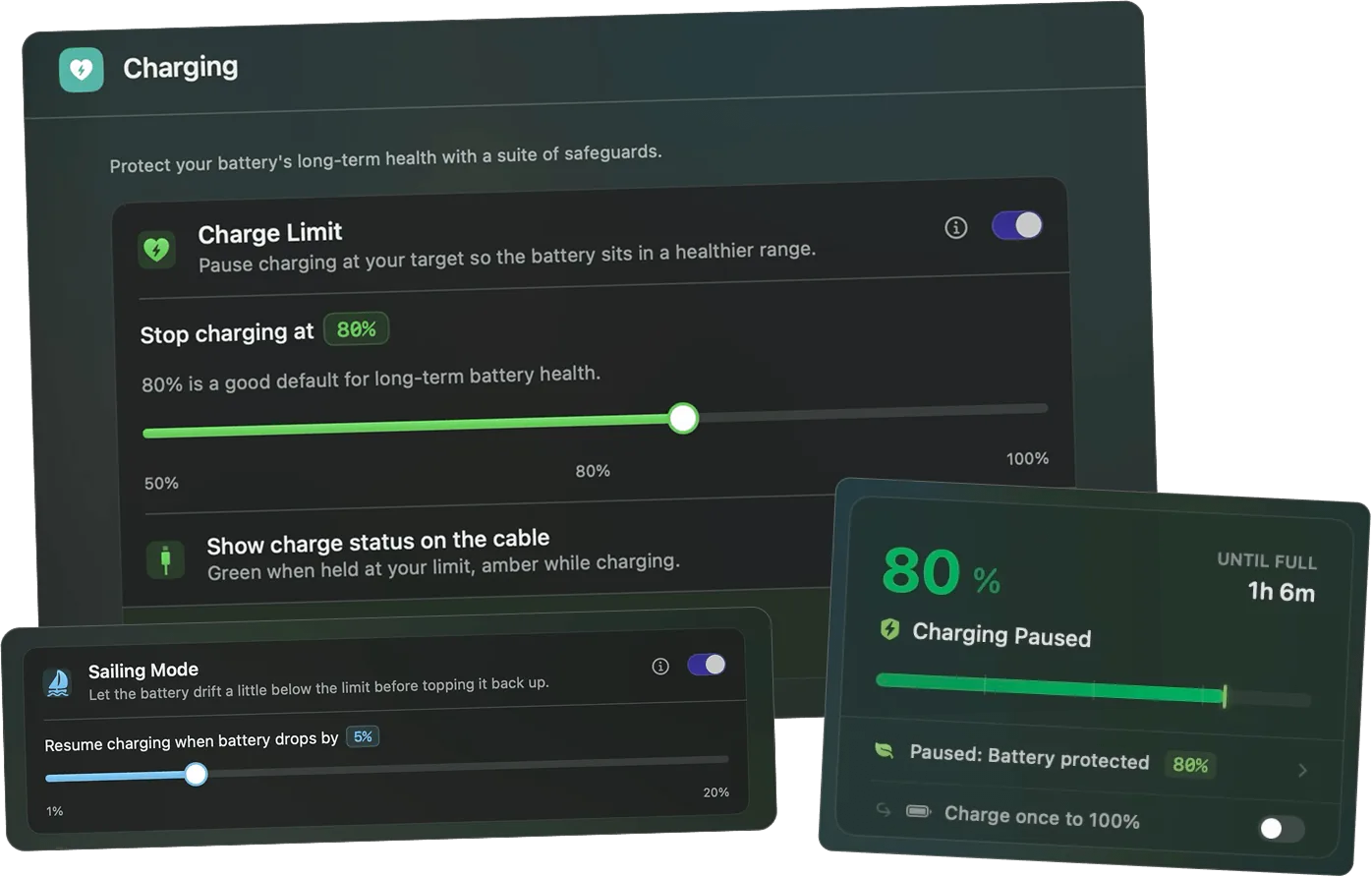
Juicy caps charging at 80% to keep your battery in the healthy 50-80% band. Sailing Mode, Heat Protection and Automatic Discharge are built in, and your MagSafe cable even turns green at the limit.
Free 3-day trial • No credit card required
Free 3-day trial • No credit card required
Juicy is available for your macOS
Get a download link reminder sent to your email when you are back in front of your computer:
We'll send you the download link. No spam.
Your battery degrades at 100%
Lithium-ion batteries age fastest when they're kept at a high charge and when they get hot. Sitting plugged in at 100% all day is one of the worst things you can do to your MacBook's battery.
Keeping the battery in the 50-80% band dramatically slows wear. macOS "Optimized Battery Charging" is a black box you can't control, Juicy gives you a hard, user-set limit instead.
Total charge control
Everything you need to protect your charge
Charge limiting, Sailing Mode, heat protection and automatic discharge, all the battery-care tools, in one app. One-tap override to 100% whenever you actually need a full day.
Charge Limit
Pause charging at your target, anywhere from 50% to 100%. 80% is the default for long-term health, but you can dial it in exactly where you want it.
Sailing Mode
Let the battery drift a few percent below the limit before topping back up, avoiding the constant micro-charging churn that slowly wears the cell.
Heat Protection
Pause charging whenever the battery gets too hot, regardless of percentage. Heat is the #1 killer of battery health, so Juicy backs off the instant it matters.
Sleep Prevention
Keep your Mac awake until the limit is reached, even with the lid closed in clamshell mode, so your charge ceiling is respected no matter how you work.
Automatic Discharge
Run the Mac off the battery until it reaches your limit, then switch back to the adapter, bringing an over-charged battery back down to a healthy level.
Cable LED Charge Status
Your MagSafe or USB-C cable LED turns green when held at the limit, and amber while charging. Battery state at a glance, no screen needed.
Need a full day? One tap.
Override your limit and charge straight to 100% in a single tap, then snap back to your healthy ceiling automatically.
All in one place
Every control in one clean panel
Set your limit, flip on Sailing Mode and Heat Protection, switch on Automatic Discharge. Every charge-care control lives in one tidy Charging panel, no Terminal commands and no guesswork.
Switching from AlDente?
Juicy does everything AlDente and Energiza do: charge limit, Sailing Mode, heat protection and automatic discharge, and adds custom battery alerts, full battery-health tracking, energy insights, and iPhone & iPad battery health, all in one app for one one-time price. No subscription.
More than a charge limiter
Most charge limiters stop at charging.
Juicy keeps going.
Charge limiting is just one of Juicy's tools. The same app handles everything single-purpose charge limiters leave out, for one one-time price.
Custom Battery Alerts
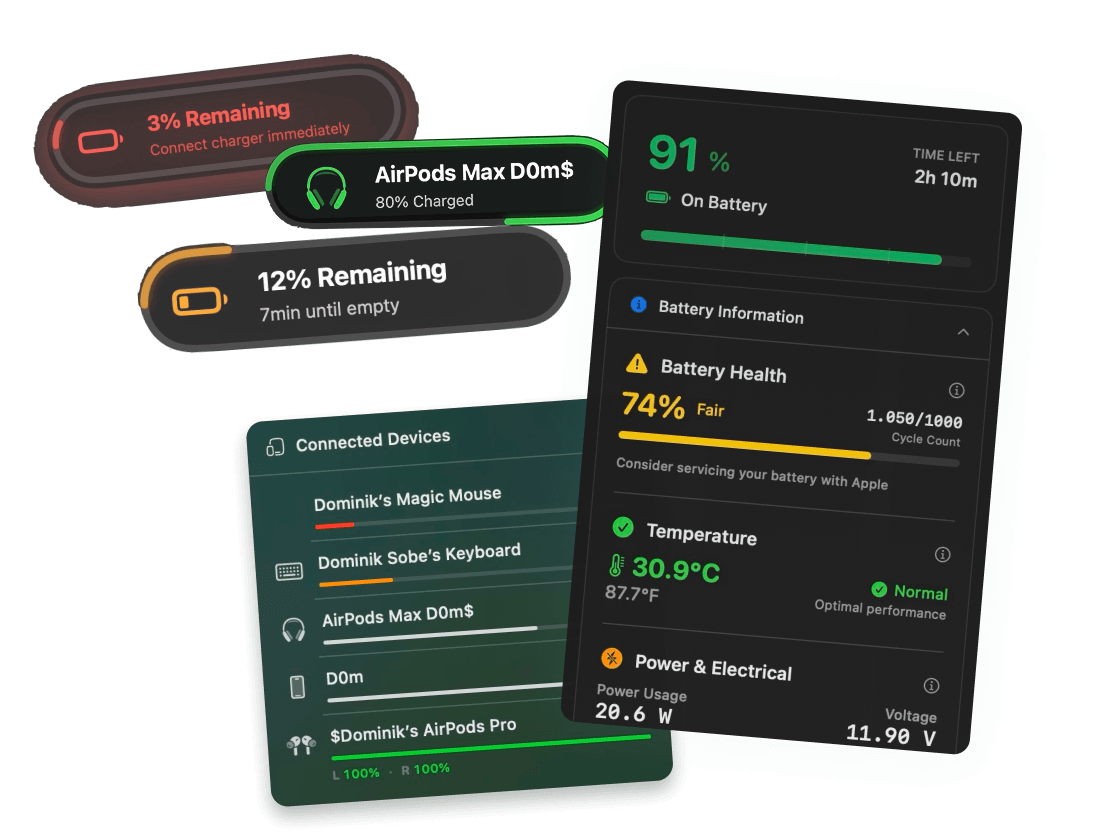
Beautiful native alerts at any percentage, with screen glow and custom sounds for each one.
Battery Health Tracking
Live health, cycle count, temperature, voltage and wattage, right from the menu bar.
Battery App Insights
See exactly which apps are draining your battery, with 24h, 7d and 30d history.
iPhone & iPad Battery
Plug in a device and read its real battery health and cycle count too. No extra app.
Power Flow
Watch the live wattage flow in and out, and see your real charging speed at a glance.
Menu Bar Battery Icon
A crisp, customizable battery icon that beats the stock macOS percentage.
Awesome MUST have
"Being able to set a full screen alert at 2% and 1% charge left has saved me from suddenly getting kicked out of Zooms and other calls before it's too late."
Cap your charge.
Extend its lifespan.
Pay once for Juicy, the all-in-one AlDente alternative, and keep your Mac's battery healthy for years.
Free Trial
3 days, full features
- Custom battery alerts at any %
- Battery health monitoring
- Lifecycle alerts & notifications
- No credit card required
Pro License
One-time payment
- Pay once, use forever
- One year of free updates
- Use on up to 2 Macs
- All Pro features unlocked
Optional renewal for another year of updates at $9.99 via the license manager once period ends
Juicy is available for your macOS
Get a download link reminder sent to your email when you are back in front of your computer:
We'll send you the download link. No spam.
Lifetime License
One-time payment
- Lifetime updates, never renew
- Use on up to 2 Macs
- All Pro features unlocked
- Support indie development
Juicy is available for your macOS
Get a download link reminder sent to your email when you are back in front of your computer:
We'll send you the download link. No spam.
14-day money-back guarantee.
If Juicy doesn't work for you, get a full refund.
Charge limit
questions
Everything about limiting your charge and keeping your MacBook battery healthy.
Can I limit my MacBook's battery charge to 80%?
Yes. Juicy lets you cap charging at any level from 50% to 100%. 80% is the recommended default for long-term battery health, and you can change it any time.
Is limiting charge to 80% actually good for battery health?
Yes. Keeping a lithium-ion battery below ~80% and out of heat is one of the most effective ways to slow capacity loss. Sitting plugged in at 100% all day is what ages the cell fastest.
Is Juicy a good AlDente alternative?
Yes. Juicy matches AlDente's charge limit, Sailing Mode, heat protection and automatic discharge, and bundles custom alerts, battery-health tracking and iPhone/iPad health in one paid-once app. See a full comparison at /compare/juicy-vs-aldente.
What does Juicy do that AlDente and Energiza don't?
Both are solid charge limiters, but they stop at charging. Juicy adds custom battery alerts at any percentage, full battery-health tracking, per-app energy insights, iPhone & iPad battery health, and a live Power Flow diagram, all in one app.
Is Juicy a subscription like Energiza Pro?
No. Energiza Pro is billed monthly or yearly, while Juicy is a one-time purchase (with an optional, low-cost renewal only if you want another year of updates). Pay once and keep the charge limiter and the whole battery toolkit for good.
Does charge limiting work on Apple Silicon (M1/M2/M3/M4)?
Yes. Charge limiting works on both Apple Silicon (M1, M2, M3, M4) and Intel Macs running macOS 15 Sequoia or later. Sonoma (14.x) and earlier are not supported.
What is Sailing Mode?
Sailing Mode lets the battery drift a little below your limit before topping it back up, avoiding the constant micro-charging that wears the cell. It keeps your charge near the limit without hammering it with tiny top-ups.
Does it work with the lid closed / in clamshell mode?
Yes. Sleep Prevention keeps your Mac awake until your limit is reached, even with the lid closed in clamshell mode, so your charge ceiling is always respected.
macOS already has Optimized Battery Charging, why do I need Juicy?
Optimized Battery Charging is automatic and uncontrollable, you can't set a target. Juicy gives you a hard, user-set ceiling, plus heat protection, automatic discharge and a visible cable indicator.
Will limiting my charge void my warranty or harm my Mac?
No. Juicy only manages charging through supported macOS power APIs. It's completely safe and reversible, turn the limit off any time and your Mac charges to 100% as normal.
Don't run out of juice.
Smart battery alerts, health insights, and beautiful design: everything you need for your Mac's battery. Use 3 days for free.
Juicy is available for your macOS
Get a download link reminder sent to your email when you are back in front of your computer:
We'll send you the download link. No spam.
 •No credit card required