Know your MacBook's
battery health in real time.
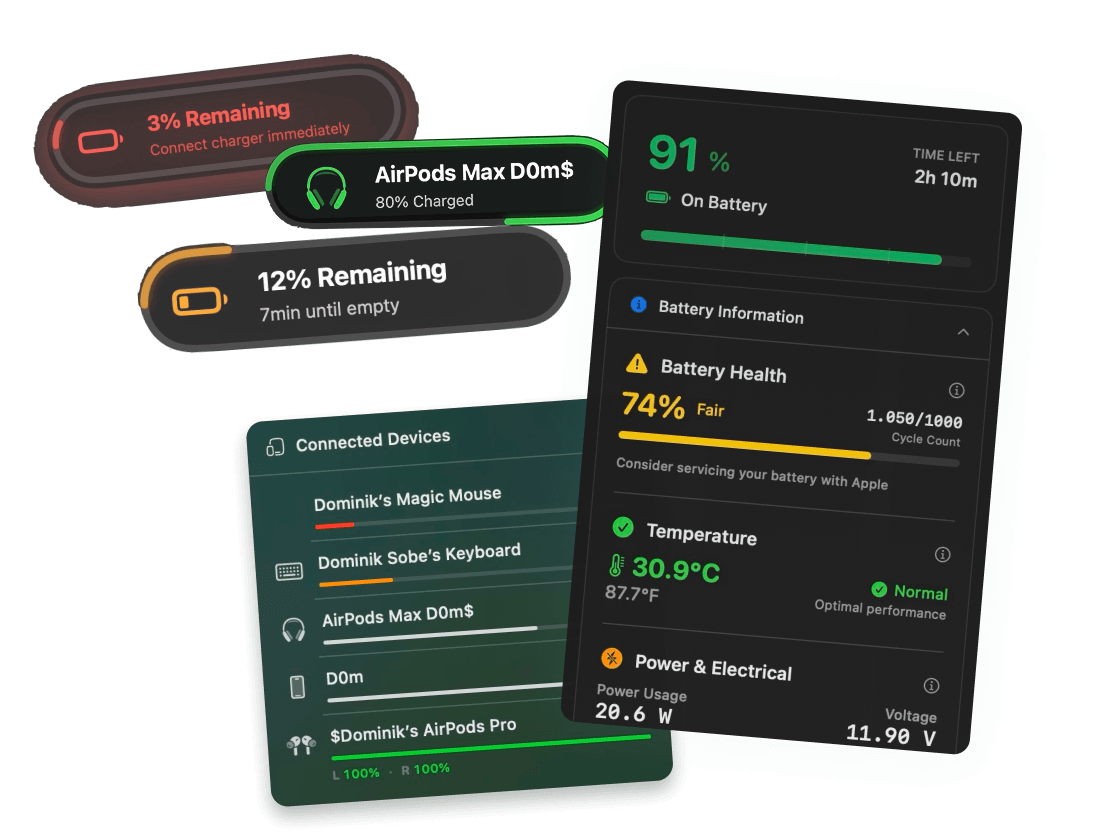
Live health percentage, cycle count, temperature warnings, and voltage monitoring — straight from your menu bar. Catch degradation early, extend your battery's lifespan.
Free 3-day trial • No credit card required
Free 3-day trial • No credit card required
Juicy is available for your macOS
Get a download link reminder sent to your email when you are back in front of your computer:
We'll send you the download link. No spam.
Your battery degrades
every day
Apple rates MacBook batteries for ~1,000 cycles before they drop below 80% capacity. After that, you lose runtime and performance.
The problem: macOS hides your health data three clicks deep in System Settings. Juicy surfaces it right from your menu bar.
Every metric, explained
Track every battery number that matters
Voltage, wattage, cycles, temperature, capacity — every single battery metric your MacBook reports, live from your menu bar.
Battery health percentage
Check your MacBook battery health in real time. Juicy compares your current maximum capacity against the original design capacity and surfaces the exact health percentage — the single most important number when you're trying to figure out how much life is left in your MacBook.
Charge cycle count
Track your MacBook charge cycle count live. Juicy is the fastest way to check cycle count on a Mac without digging into System Information — see exactly how many full cycles you've completed against Apple's rated maximum of 1,000.
Battery temperature
Monitor live MacBook battery temperature in Celsius or Fahrenheit. Heat is the #1 cause of premature battery degradation — Juicy is the Mac battery temperature monitor that tells you the instant your battery crosses the safe threshold.
Battery voltage
Track MacBook battery voltage live. Juicy is the Mac battery voltage app that shows exactly what your cells are doing — unusual readings are one of the earliest signs of chemistry problems, long before Apple's service threshold ever kicks in.
Live power usage (watts)
Watch the exact wattage your Mac is pulling from battery. Juicy is a live Mac power usage monitor — perfect for identifying which apps are eating your battery and how many watts your laptop actually draws under real workloads.
Amperage (mA) tracking
Monitor real-time current flow in and out of your battery in milliamps. Combined with voltage, amperage tells you exactly how hard your battery is being worked — a must-have for anyone who wants to track MacBook battery current draw precisely.
Capacity in mAh
Track current full capacity, original design capacity, and remaining charge — all in raw mAh. These are the numbers behind the health percentage, and the only way to see exactly how much capacity your MacBook battery has lost over time.
Time remaining estimate
See exactly how long your MacBook battery will last in hours and minutes, continuously recalculated based on your real-time power draw. No more guessing how long will my Mac last on battery — Juicy gives you a live runtime estimate directly in the menu bar.
Service recommendations
When your battery drops below Apple's service threshold or shows other faults, Juicy flags it prominently in your menu bar — so you can book a Genius Bar appointment before you're stranded somewhere without power.
100% local, 100% private.
Every battery metric is processed on your Mac. Nothing is ever sent to a server.
Always one click away
Right from your menu bar
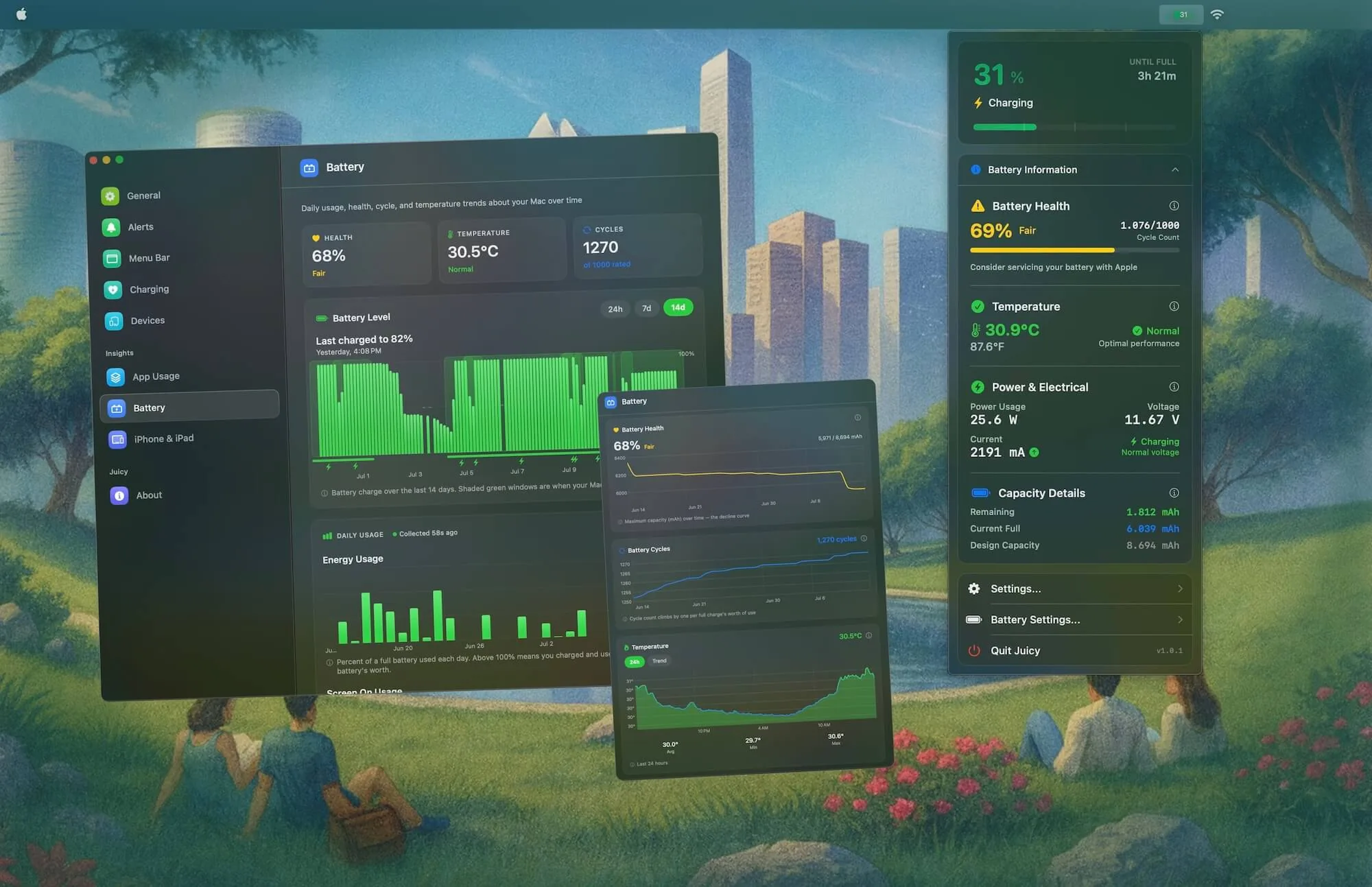
No digging through System Settings. Click the Juicy icon in your menu bar and see your full battery health — capacity, cycles, temperature, voltage — at a glance.

Usage history
See your usage, day by day
Juicy tracks how much battery you actually burn through each day and how long your screen stays on, across 7, 30 or 90 days. Spot the heavy days, then pair them with live wattage to find the cause.
Percent of a full battery used each day. Above 100% means you charged and used more than one battery's worth.
Want it broken down by app? See which apps are draining your battery.
This is why I like Mac OS
"It can tell you that your battery is low as well as your battery health. This IS what I need for my Mac."
Protect your battery.
Extend its lifespan.
Pay once for Juicy and keep your Mac's battery healthy for years.
Free Trial
3 days, full features
- Custom battery alerts at any %
- Battery health monitoring
- Lifecycle alerts & notifications
- No credit card required
Pro License
One-time payment
- Pay once, use forever
- One year of free updates
- Use on up to 2 Macs
- All Pro features unlocked
Optional renewal for another year of updates at $9.99 via the license manager once period ends
Juicy is available for your macOS
Get a download link reminder sent to your email when you are back in front of your computer:
We'll send you the download link. No spam.
Lifetime License
One-time payment
- Lifetime updates, never renew
- Use on up to 2 Macs
- All Pro features unlocked
- Support indie development
Juicy is available for your macOS
Get a download link reminder sent to your email when you are back in front of your computer:
We'll send you the download link. No spam.
14-day money-back guarantee.
If Juicy doesn't work for you, get a full refund.
Battery health
questions
Everything about tracking, interpreting, and protecting your MacBook battery.
How does Juicy check my MacBook's battery health?
Juicy uses its own purpose-built battery diagnostics technology that surfaces deeper, more frequent, and more clearly-formatted data than what's buried in System Settings. You get live readings for capacity, cycle count, temperature, voltage, amperage, wattage, and raw mAh — all refreshed continuously and packaged in one glanceable menu bar panel.
What's a normal battery cycle count for a MacBook?
Modern MacBooks (M1 and newer) are rated for 1,000 charge cycles before dropping below 80% of their original capacity. Older Intel Macs are typically rated for 1,000 as well. Juicy shows your current count against this rating.
When should I worry about my Mac's battery health?
macOS flags your battery as 'Service Recommended' when capacity drops below ~80% or the battery shows other faults. Juicy surfaces this warning prominently in the menu bar so you don't miss it.
Does tracking battery temperature actually matter?
Yes. Heat is the fastest way to kill a lithium-ion battery. Keeping your battery below 35°C / 95°F during heavy use significantly extends its lifespan. Juicy warns you when it gets too hot.
What's a normal voltage reading for a MacBook battery?
Most MacBook batteries sit between 10.5 V and 13.0 V depending on the state of charge. Unusual voltage drops or spikes are often the first sign of cell damage — Juicy tracks voltage live so you can spot problems early.
Can I see how many watts my MacBook is actually using?
Yes. Juicy shows your Mac's live wattage (power draw) in real time, updated continuously from the menu bar. It's the easiest way to see exactly how much power your MacBook is pulling at any given moment — especially helpful for diagnosing battery-hungry apps.
How do I check my MacBook's remaining mAh capacity?
Juicy surfaces three separate mAh numbers: remaining capacity (how much charge you have left), current full capacity (what 100% means today), and design capacity (what 100% meant when your Mac was new). The gap between current full and design capacity is your real degradation.
Is my battery data sent anywhere?
No. Juicy processes everything locally on your Mac. No cloud sync, no analytics on your hardware metrics, nothing. Your battery data stays on your device — period.
Does Juicy work on Intel Macs too, or only Apple Silicon?
Both. Juicy supports MacBook Pro, MacBook Air, and iMac models running macOS 15 Sequoia or later, on both Apple Silicon (M1, M2, M3, M4) and Intel-based Macs.
Don't run out of juice.
Smart battery alerts, health insights, and beautiful design: everything you need for your Mac's battery. Use 3 days for free.
Juicy is available for your macOS
Get a download link reminder sent to your email when you are back in front of your computer:
We'll send you the download link. No spam.
 •No credit card required