Heat is the number one enemy of lithium-ion batteries. A MacBook battery running at 40 Celsius (104 Fahrenheit) degrades significantly faster than one sitting at 25 Celsius (77 Fahrenheit). Keep it hot long enough, and you lose capacity you will never get back.
Here is the frustrating part: macOS has absolutely no built-in way to check your battery temperature. Apple reads the sensor internally, but they do not show it to you. No menu, no System Settings panel, nothing.
Here is how to see your Mac's battery temperature live, in one click, and why it matters more than most people think.
Quick Answer
macOS does not show battery temperature in System Settings or anywhere in the default UI. To see your Mac's battery temperature live in Celsius or Fahrenheit, install Juicy. It reads the battery's internal temperature sensor and displays it right in your menu bar, updated continuously.

Why Battery Temperature Matters
Lithium-ion cells are extremely sensitive to heat. Here is what high temperature does to your MacBook battery:
- Above 35 Celsius (95 Fahrenheit): accelerated capacity loss. Every hour spent at this temperature shortens overall battery life.
- Above 40 Celsius (104 Fahrenheit): significant stress. Running here repeatedly can shave months off your battery's usable lifespan.
- Above 45 Celsius (113 Fahrenheit): serious damage zone. Cells may degrade permanently, and macOS may start throttling performance to protect the battery.
Apple's official recommendation is to operate your MacBook between 10 and 35 Celsius (50 to 95 Fahrenheit). The problem is, without a temperature reading, you have no way to know when you are over the line.
The Problem: macOS Completely Hides Battery Temperature
This is the part that annoys most people. Apple has the sensor data. macOS reads it internally and uses it to make thermal decisions. But they do not show it to you anywhere:
- Not in System Settings, Battery. You see charge level and Low Power Mode toggles, nothing about temperature.
- Not in System Information, Power. Cycle count, capacity, voltage, but no temperature.
- Not in Activity Monitor. Activity Monitor shows CPU and GPU temps on some hardware, but not battery temperature directly.
- Not in the Battery menu bar icon. Click it and you see time remaining, nothing else.
If you want battery temperature, you have to use a third-party app. Juicy is the cleanest option because it is built specifically for battery monitoring.
The Solution: Use Juicy to See Live Battery Temperature
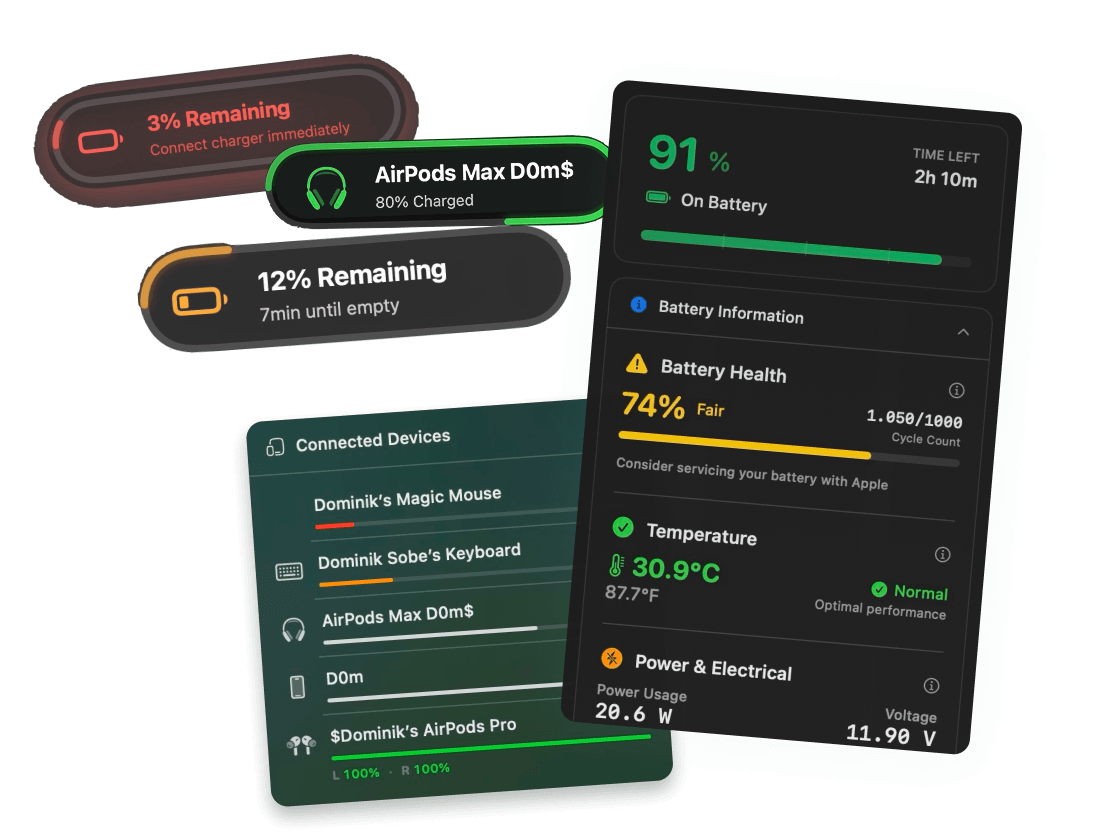
Juicy is a native Mac app that reads your battery's temperature sensor live and displays it in your menu bar. Featured by Apple in "Apps We Love" on the Mac App Store, Juicy gives you the data macOS deliberately hides.
What Juicy Shows You:
- Live battery temperature in Celsius or Fahrenheit, updated continuously
- Color-coded warnings when temperature crosses the safe threshold
- All other battery metrics alongside temperature (health, cycles, voltage, wattage, mAh)
- Historic context so you can see if your temperature is trending up under load
How to Check Mac Battery Temperature with Juicy
Step 1: Download Juicy
Option A: Go to getjuicy.app and click "Download Juicy for Mac"
Option B: Open the Mac App Store, search for "Juicy", and download it directly.
💡 Tip: Juicy offers a 3 day free trial with full features. No credit card required.
Step 2: Click the Juicy Menu Bar Icon
Once Juicy is running, click its icon in your menu bar. You will see a full battery panel with every metric.
Step 3: Read Your Battery Temperature
Look for the temperature readout. You will see something like:
Or, during a heavy export or compile:
Juicy automatically handles unit conversion. You can toggle between Celsius and Fahrenheit in settings.
What Is a Safe Battery Temperature for a MacBook?
Here is a practical range based on Apple's guidelines and lithium-ion chemistry:
Temperature (C) | Temperature (F) | Status |
Under 25 | Under 77 | Cool, no stress |
25 to 35 | 77 to 95 | Normal operating range |
35 to 40 | 95 to 104 | Warm, accelerated wear if sustained |
40 to 45 | 104 to 113 | Hot, noticeable long-term damage |
Above 45 | Above 113 | Danger zone, macOS may throttle |
For everyday work (browsing, writing, coding, video calls), your battery should sit well under 35 Celsius. If you see it climbing past that during light workloads, something is wrong (runaway process, dust buildup, bad ambient temperature, or a charger issue).
What Causes High MacBook Battery Temperature?
The usual culprits:
- Heavy CPU/GPU workloads. Video rendering, 3D work, large code compilation, or training ML models.
- Poor ventilation. Using your MacBook on a bed, pillow, or blanket blocks the vents and traps heat.
- Runaway background processes. A misbehaving app can max out your CPU silently. Activity Monitor can help identify it.
- High ambient temperature. Working outside on a hot day with direct sun on your Mac.
- Dust inside the fans. Over years, dust accumulates and reduces cooling efficiency.
- Charging at high load. Charging while running heavy workloads heats both the battery and the internals.
Juicy does not solve these problems directly, but it gives you the signal to catch them before they damage your hardware.
Why Not Use istats or Other Sensor Apps?
There are general-purpose sensor apps for Mac that also show battery temperature as one of many readings. They work, but:
- Too much noise. Most sensor apps show dozens of readings across CPU, GPU, SSD, fans, ambient sensors, and more. You have to hunt for the battery temperature.
- No context. They show the raw number without telling you what is safe and what is not.
- Heavier on system resources. Reading every sensor on your Mac uses noticeably more CPU than Juicy's targeted battery monitoring.
If you only care about battery health and temperature, a focused app like Juicy is simpler and lighter.
FAQ
What temperature is too hot for a MacBook battery?
Anything sustained above 35 Celsius (95 Fahrenheit) accelerates degradation. Above 40 Celsius (104 Fahrenheit) is genuinely hot and starts causing real damage if it happens often.
How do I see battery temperature in macOS without an app?
You cannot. Apple does not expose battery temperature in any built-in UI (System Settings, System Information, Activity Monitor, or the battery menu bar icon). You need a third-party app.
Does my MacBook have a battery temperature sensor?
Yes. Every modern MacBook battery has an internal temperature sensor built into the pack. macOS reads it constantly, just without showing it to you.
Will high temperature brick my MacBook?
No, your Mac will not catch fire from normal use. But sustained high temperatures will shorten your battery's usable lifespan by months or even years.
Does Juicy notify me when my battery gets hot?
Yes. Juicy can flag high-temperature events in the menu bar panel, so you notice them before they become a pattern.
Keep Your MacBook Battery Cool
Your MacBook battery is happier than you think when you give it the right conditions. With Juicy, you get:
- Live battery temperature, in Celsius or Fahrenheit
- Every other battery metric (health, cycles, voltage, wattage) in one panel
- Beautiful battery alerts
- 100% local, no cloud sync, no tracking