8 Gift Ideas for Mac Users Who Already Have Everything
Aug 5, 2026 • 6 min read By Dominik, maker of JuicyThe best gifts for Mac users are the ones they would never buy for themselves: a stand that fixes their neck, a charger that finally beats Apple's brick, software that runs quietly and does one thing well. Skip the cables and cases. Here are eight that hold up.
Most gift guides for "Apple fans" default to whatever is trending on Amazon that month. The list below skips the obvious picks (another case, another dongle) in favor of things a Mac person keeps using a year later.
A laptop stand that actually gets used
Most people prop their MacBook on a stack of books for two years before buying a proper stand, and then wonder why their neck feels better. An aluminum stand like the Rain Design mStand or Twelve South Curve raises the screen to eye level and angles the keyboard for typing, and it matches the laptop closely enough that it looks like it belongs on the desk. Roughly $40 to $70, and it works for any Mac laptop, so you do not need to know which model they own.
A charger that beats the one in the box
Apple ships a single-port brick with most Macs, which is fine until you also need to charge a phone, a watch, and a pair of headphones from one outlet. A compact GaN charger from Anker or Ugreen with two or three USB-C ports replaces the whole tangle of adapters on a desk or in a travel bag. Good ones run about $30 to $60 and charge a MacBook just as fast as Apple's own charger.
Juicy – The best Mac battery app: our pick
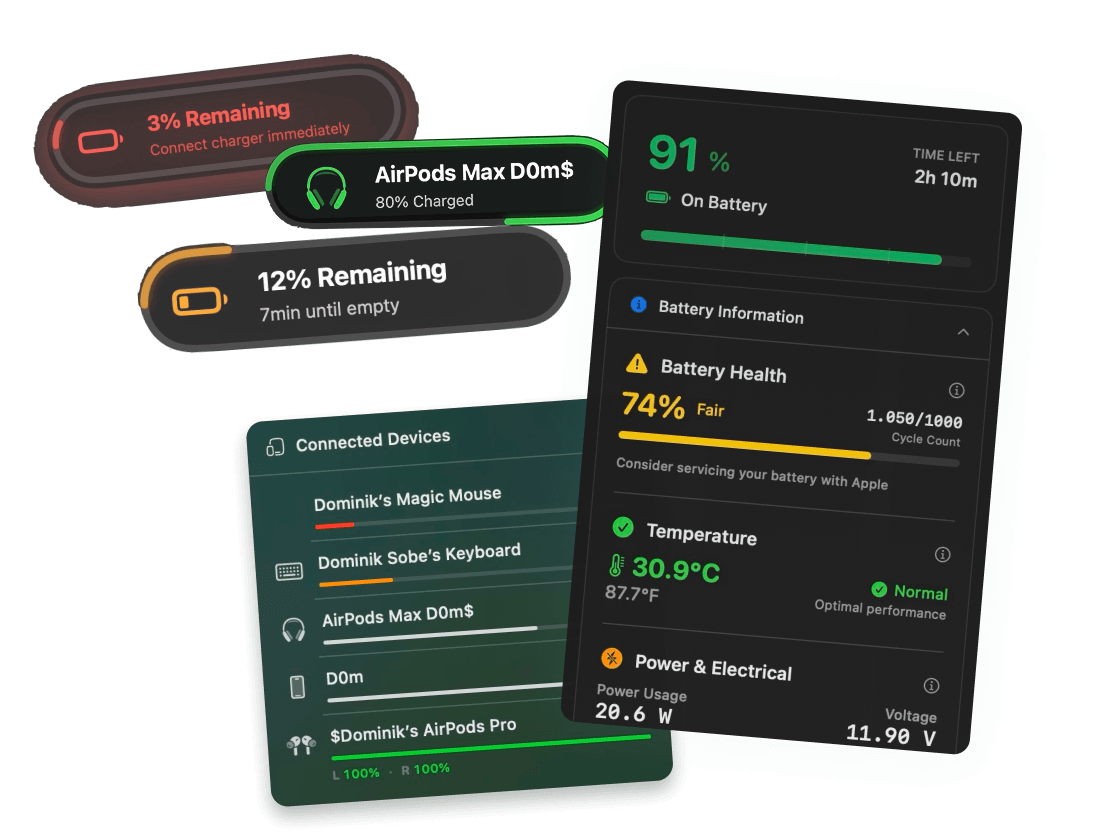
Full disclosure, we built this one. Juicy is a menu bar app that watches a Mac's battery so the owner does not have to: alerts at whatever percentage they actually care about, a charge limit so the battery is not sitting at 100% all day, and a health graph that shows cycle count and capacity trending down before it becomes a real problem.
It is a good gift specifically because it is invisible until it matters. No dashboard to check, no subscription to remember, just a quiet menu bar icon and a notification the one time they actually need it. It works especially well for anyone who leaves their laptop plugged in at a desk all day, which quietly wears the battery down over a year or two, or anyone who has had a Mac shut off on them at 9 percent mid-meeting.
It is a one-time $24.99 for a lifetime license on up to two Macs, no renewal. If you want to send it as an actual gift, with your own message attached and a scratch-card reveal for the license key, there is a dedicated gifting flow built for exactly that. If their battery already needs some love, how to keep a MacBook battery healthy is worth reading together after they open it.
An AirTag, for the one who has lost a bag before
Not exciting to unwrap, but genuinely useful for anyone who has ever set a MacBook bag down in a coffee shop and had a small heart attack five minutes later. Attach one to the laptop sleeve or the bag itself and it shows up in Find My alongside their other Apple devices. About $29 for one, less per unit in a four-pack if you are buying for more than one person.
A keyboard that feels different from typing all day
If they spend eight hours a day on Apple's built-in keyboard, a mechanical one is a genuinely noticeable upgrade, not just a novelty. A Keychron with a Mac layout (the option and command keys in the right place, backlighting, a knob if you want one) is the safe, well-reviewed pick. Expect to spend $80 to $110 for a good low-profile one that will not feel like a typewriter next to a laptop.
An external SSD, the backup they will never buy themselves
Almost nobody backs up their Mac until they lose something they cannot get back. A small external SSD like a Samsung T7 or SanDisk Extreme, paired with Time Machine, turns "I should really back this up" into a five-minute setup they will actually finish because you already bought the drive. A 1TB drive runs roughly $70 to $110 and is fast enough to feel like a second internal disk.
Software that quietly makes the whole Mac better
A Setapp subscription bundles dozens of well-regarded Mac utilities (window managers, cleanup tools, and yes, Juicy is in there too) into one monthly price, which makes it a good gift for someone who likes trying new tools but does not want to buy each one separately. It is the closest thing to "a gift card for the entire indie Mac app scene," and at around $10 to $13 a month it is easy to gift a few months at once.
A sleeve or bag with actual character
Function matters, but so does not carrying the exact same neoprene sleeve as everyone else in the coffee shop. Bellroy and Native Union both make laptop sleeves and bags in genuinely nice materials and colors that do not scream "tech accessory." A padded sleeve runs about $50 to $80, a full bag more like $100 to $180.
All eight, side by side
| Gift | Best for | Rough price |
|---|---|---|
| Laptop stand | Anyone who works at a desk | $40 to $70 |
| GaN charger | Anyone tired of adapter tangles | $30 to $60 |
| Juicy | Anyone who keeps their Mac plugged in, or has had it die at a bad moment | $24.99 once |
| AirTag | Anyone who has misplaced a bag before | $29 |
| Mechanical keyboard | Anyone typing 8 hours a day | $80 to $110 |
| External SSD | Anyone who has never backed up | $70 to $110 |
| Setapp subscription | Anyone who likes trying new tools | $10 to $13/mo |
| Sleeve or bag | Anyone who wants theirs to look different | $50 to $180 |
Pick based on what they complain about, not what looks good wrapped. The person whose laptop dies mid-meeting wants Juicy. The person who has lost a bag once wants an AirTag. The person hunched over their desk wants a stand. That is really the whole trick to a good Mac gift: solve the specific annoyance, not the generic category.
Frequently asked questions
What's a good gift for someone who just got a new Mac?
Skip the accessories they will pick themselves in the first week (case, sleeve) and go for the ones they will not: a proper stand, a charger better than the one in the box, or an external drive so their first backup happens on day one instead of two years too late.
How much should you spend on a gift for a Mac user?
Most of the ideas below land between $25 and $90. A gift card to the App Store or Setapp works at almost any budget, and a Juicy lifetime license is a fixed $24.99 no matter when you buy it.
Is software actually a good gift?
Yes, if it is something they will open more than once. A one-time license for a tool that runs quietly in the background, like a battery app or a window manager, beats a subscription they will forget to use or cancel.
Do you need to know their exact Mac model to gift them Juicy?
No. Juicy runs on any Mac with macOS 15 (Sequoia) or newer, Apple Silicon or Intel. You only need their email address, not their laptop's specs.