Can You Increase iPhone Battery Capacity? (Honest Answer)
Jul 20, 2026 • 6 min read By Dominik, maker of JuicyNo, you cannot increase your iPhone's maximum battery capacity. Maximum Capacity measures permanent physical wear in the battery cells, and it only goes down with use, never back up. No app, reset, or calibration trick can raise it. The only real reset is a battery replacement. What you can do is slow the decline.
Verified on iOS 26 in July 2026. This is a physics answer, not a software one, so it holds across every iPhone and iOS version.
That is the part nobody selling a "battery booster" wants you to hear. Here is why it is true, what genuinely does not work, and what you can actually do about it.
Why lithium-ion capacity only decreases
Your iPhone battery is a lithium-ion cell, and every cell has a finite number of chemical cycles in it. Each time you charge and discharge, microscopic changes build up inside: the electrode material degrades, a little lithium gets locked away where it can no longer carry charge, and internal resistance creeps up.
None of that reverses. It is wear, in the same way tire tread or brake pads wear. Maximum Capacity is simply Apple's readout of how much of the original capacity survives, and by definition it can only fall or hold steady, never climb.
So when your iPhone reads 86 percent, it is telling you the cells have permanently lost 14 percent of the charge they could once hold. There is no menu, update, or ritual that gives those cells back. The number going up would mean the battery got physically younger, which is not a thing that happens.
What does NOT work (the myths, plainly)
The search for a capacity boost is a magnet for bad advice. None of the following raises Maximum Capacity, and it helps to know why before you waste an afternoon.
- Factory resets and restores. These wipe software. The battery is hardware. Restoring iOS changes nothing about worn cells. If you see a point tick up afterward, that is the estimate recalibrating, not capacity returning.
- Full-drain "calibration" cycles. Draining to 0 and charging to 100 repeatedly does not heal a battery. On lithium-ion it does the opposite, because both extremes are exactly the stressful states that cause wear.
- "Battery booster" or "capacity increase" apps. No app on the App Store can touch the battery's physical chemistry, and none can read a higher Maximum Capacity than the battery reports. At best they are placebos that show you a recalibrated number and take credit; at worst they are ads with a progress bar.
- Cooling, freezing, or "conditioning" tricks. Extreme cold can temporarily change how a battery behaves, but it does not restore lost capacity, and freezing a phone risks condensation damage.
- Turning features off. Dropping brightness or disabling background refresh saves runtime today, which is worth doing, but it does not add capacity back. It stretches the charge you have; it does not enlarge the tank.
If a tip promises to raise Maximum Capacity, that is the tell that it is fiction. The number is a wear gauge, and you cannot un-wear a battery.
What actually helps: slow the decline
Here is the useful pivot. You cannot reverse wear, but you strongly influence how fast it happens. Two identical iPhones can be a year apart in battery health purely from habits.
The levers that matter:
- Stay in the middle. Avoid long stretches at 100 percent or near 0 percent. Optimized Battery Charging handles the overnight part automatically, and iPhone 15 and later add a hard 80 percent cap.
- Keep it cool. Heat is the fastest permanent damage there is. Do not fast charge in a hot case or leave the phone in the sun.
- Do not chase 100 percent. Topping up little and often is gentler than full drains.
- Update iOS. Apple's battery management improves over time.
We go deep on the day-to-day version of this in how to take care of your iPhone battery. The goal is not to stop the decline, which is impossible, but to make it gentle enough that the battery outlasts your interest in the phone.
When a replacement is the only real fix
Once capacity has dropped, the single honest way back to 100 percent is a new battery. A replacement installs a physically fresh cell, so Maximum Capacity resets to 100 percent and the cycle count starts over at zero.
Apple charges roughly $89 to $99 for an out-of-warranty iPhone battery, and it is free under AppleCare+ once you are below 80 percent capacity. Below 80 is also where iOS may start throttling peak performance, so that is the sensible threshold to act on. For where that 80 percent line comes from and what your number means, see iPhone battery capacity explained.
Track your real decline with Juicy
If you cannot increase capacity, the smart move is to watch it, so you know how fast it is falling and whether your habits are helping. iOS makes that hard: it shows one slow number and, on iPhones older than the 15, no cycle count at all.
Plug your iPhone into your Mac and Juicy's iPhone and iPad diagnostics read the real data off the device: health percentage, cycle count on any model, temperature, and capacity in mAh, with nothing installed on the phone. (This is in Juicy's direct download and Setapp versions, not the Mac App Store build.)
The same cable trick works for an iPad, which matters more there because iPadOS hides battery health on most models. See how to check iPad battery health.
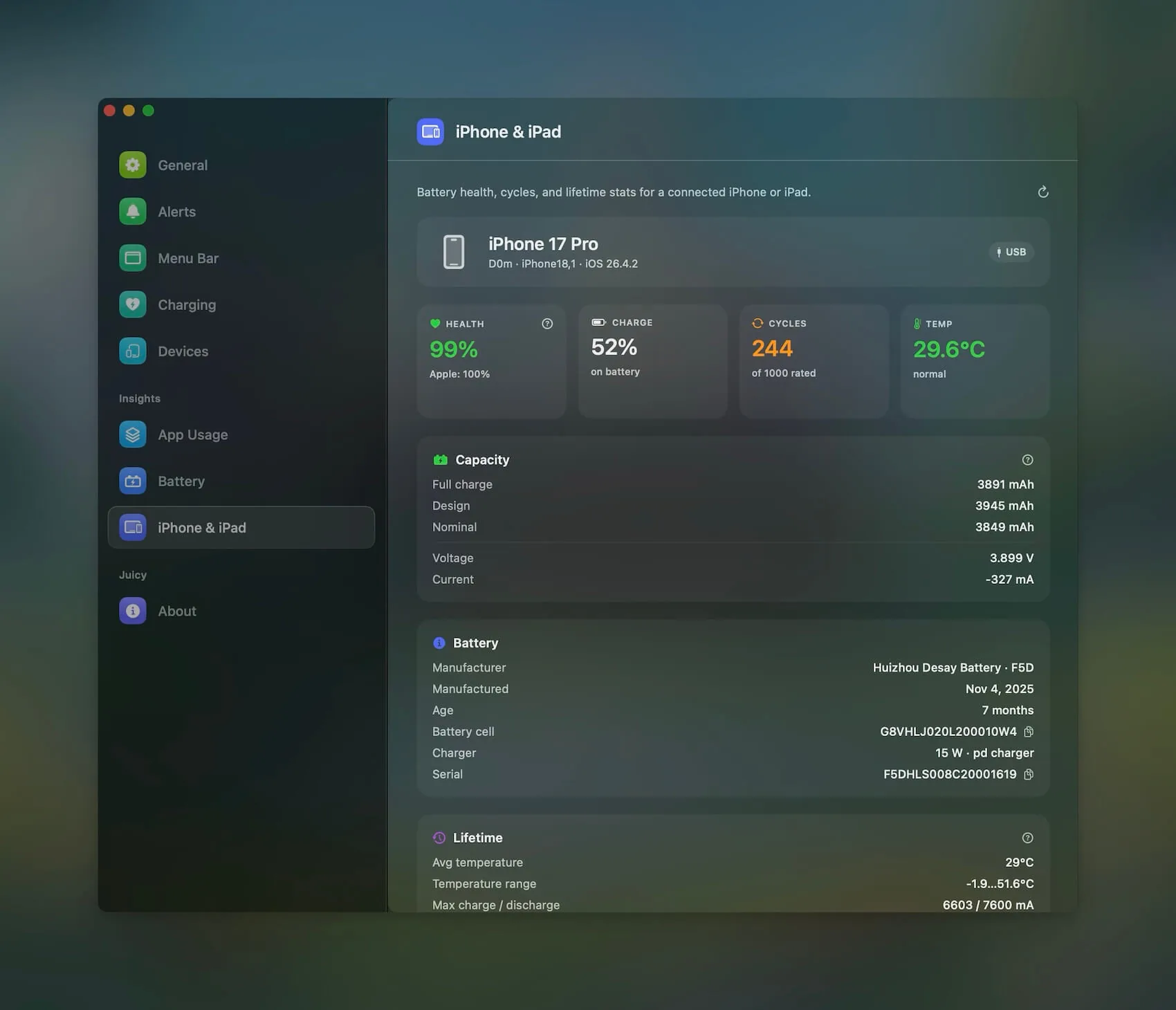
Because Juicy keeps the history, you see the slope, not just today's figure. A gentle line means your care is working; a steep one tells you to fix the heat or the charging before the next point drops. It is a native menu-bar app, featured by Apple, 4.85 stars, with a free 3-day trial and no credit card.
You cannot make the number go up. Juicy just makes sure you see it going down slowly, on purpose, instead of finding out the hard way. If you first want to confirm exactly what your battery reads, start with how to check iPhone battery capacity.
Frequently asked questions
Can you increase iPhone battery maximum capacity?
No. Maximum Capacity measures physical wear in the cells, and that wear is permanent. It only moves down over time, never up. No setting, app, or trick can raise it. The single way to get back to 100 percent is a battery replacement, which is a physically new cell.
Does resetting iPhone increase battery health?
No. A reset or factory restore wipes software, not the battery's physical wear, so Maximum Capacity reads the same afterward. If the number ticks up a point, that is iOS recalibrating its estimate, not real capacity returning. The cells do not care that you reinstalled iOS.
Can a new battery restore 100 percent capacity?
Yes, and it is the only thing that can. A replacement installs a brand new cell, so Maximum Capacity resets to 100 percent and the cycle count starts over at zero. Apple charges roughly $89 to $99, and it is free under AppleCare+ if you are below 80 percent.
Why won't my iPhone battery capacity go back up?
Because it physically cannot. Lithium-ion cells lose a little usable capacity with every cycle, and that loss is one directional. Small upward jiggles you might see are just the estimate recalibrating, not recovery. Once capacity drops, the only way back to full is new hardware.