iPhone Battery Capacity Explained (and What's a Good Number)
Jul 20, 2026 • 6 min read By Dominik, maker of JuicyOn an iPhone, battery capacity means how much charge the battery can hold now versus when it was new. Settings > Battery > Battery Health & Charging shows it as Maximum Capacity, a percentage. 100 percent is new, 80 percent is where Apple flags it, and below 80 percent you notice clearly shorter runtime.
Verified on iOS 26 in July 2026. The Battery Health screen has worked this way since iOS 11.2.
That is the one-line version. If you want to actually understand the number, there are two kinds of "capacity" people mix up, and knowing the difference is what turns "is 85 percent bad?" from a guess into an answer.
mAh vs Maximum Capacity: two different numbers
The word capacity gets used for two things, and only one of them shows up in Settings.
Rated capacity in mAh is the battery's designed size, a fixed spec of the physical cell. An iPhone 15 ships with a battery around 3,349 mAh; a 15 Pro Max is closer to 4,422 mAh. Bigger number, more energy stored, longer runtime. This figure never changes for a given model, and Apple does not display it anywhere in iOS.
Maximum Capacity, the percentage in Battery Health, is a health readout. It compares how much your battery can hold today against that original mAh rating. A brand new battery reads 100 percent. After wear, it might read 88 percent, meaning it now holds 88 percent of its designed mAh.
So mAh tells you how big the tank was when new, and Maximum Capacity tells you how much of that tank still works. When people ask about "iPhone battery capacity," they almost always mean the second one, because it is the one that changes and the one Apple actually shows you.
How to read your capacity in Settings
- Open Settings.
- Tap Battery.
- Tap Battery Health & Charging.
- Read Maximum Capacity.
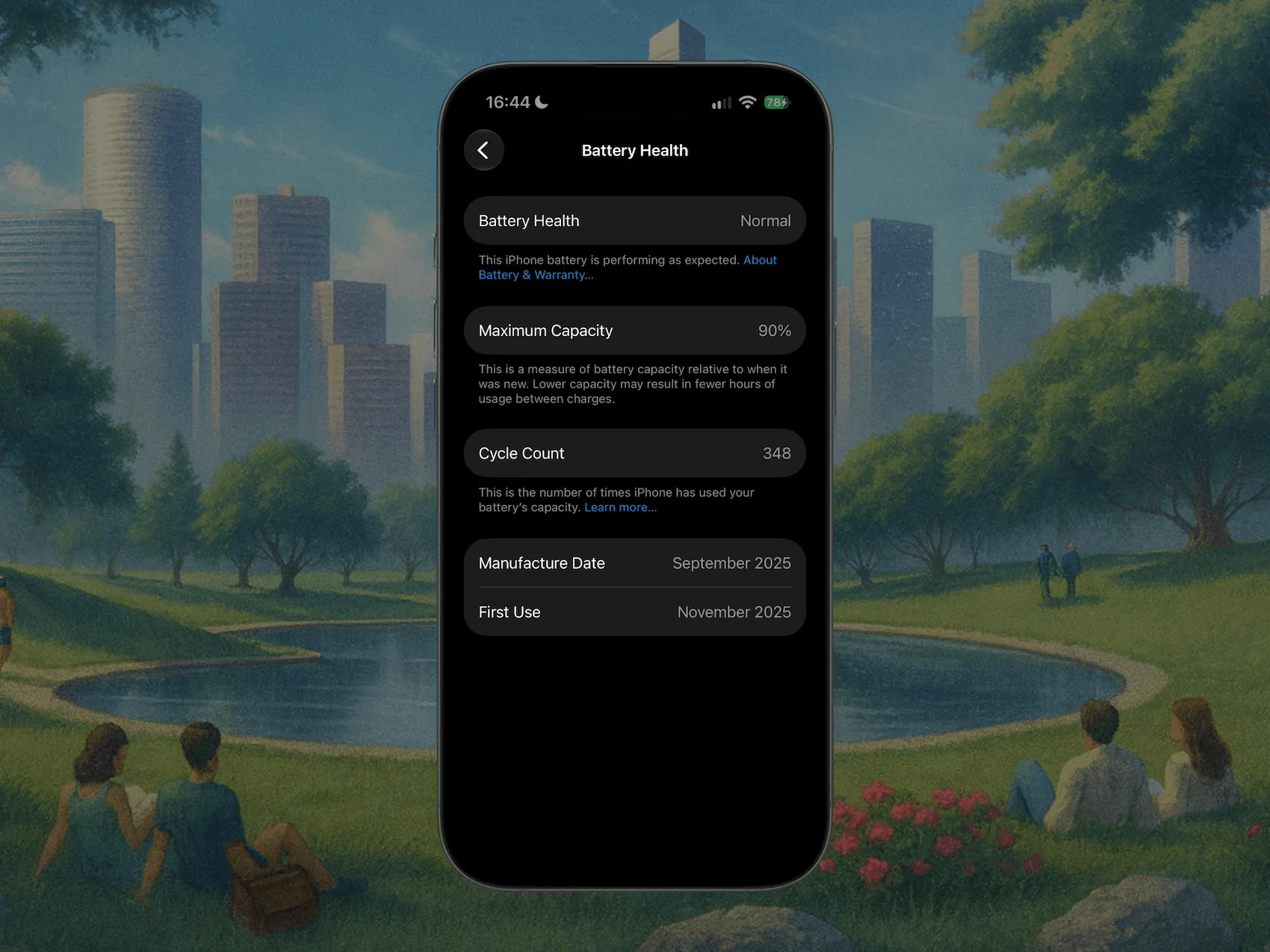
On the same screen, Peak Performance Capability tells you whether iOS has ever had to throttle the phone because the battery could not deliver enough power. Anything other than a clean "supporting normal peak performance" means the battery is further along than the percentage alone suggests. For the full walkthrough, including cycle count on iPhone 15 and later, see how to check iPhone battery capacity.
One quirk worth knowing: Maximum Capacity is an estimate that recalibrates. It can hold steady for months, then drop two points in a week. That is the math catching up, not sudden damage.
What's a good vs bad capacity
There is no single good number, only good for the battery's age. Here is the practical scale.
| Maximum Capacity | Verdict |
|---|---|
| 100 to 95 percent | New or barely used |
| 94 to 85 percent | Normal wear, typical after 1 to 2 years |
| 84 to 80 percent | Worn, expect visibly shorter days |
| Below 80 percent | Apple calls this consumed, replacement territory |
The 80 percent line is not folklore. It is the threshold Apple's own warranty and AppleCare+ service uses, and it is where a battery is considered "consumed." Under 80 percent with AppleCare+, the replacement is free.
So to answer the two questions everyone actually types: 85 percent is good, healthy, and normal. Anything bad starts below 80 percent, where the runtime gets short enough to notice and iOS may start throttling performance.
At what capacity should you replace the battery?
Use these rough brackets:
- Above 85 percent: keep it. The battery is fine and a replacement would not change your day.
- 80 to 85 percent: judgment call. If the phone still lasts your day, wait. If you are reaching for a charger by mid-afternoon, a swap is worth it.
- Below 80 percent: replace it. This is where Apple flags the battery, where AppleCare+ covers a free swap, and where you are living on borrowed runtime.
A replacement runs roughly $89 to $99 at Apple out of warranty, and it buys an otherwise healthy phone another couple of years for a fraction of an upgrade. Importantly, a replacement is also the only way the number goes back up, because capacity loss is permanent. If you were hoping to reverse it with a setting, read can you increase iPhone battery capacity first.
Why capacity is only half the picture
Maximum Capacity is one number with no context. It does not tell you the cycle count, the temperature history, or how fast the battery is trending down. Two iPhones both reading 84 percent can be in very different shape: one gently aged over three years, the other cooked in six months by heat and constant fast charging.
To judge a battery properly you want capacity, cycle count, and the trend together. iOS gives you the first, hides the second on iPhones older than the 15, and never shows the third.
Get the full picture with Juicy
Plug your iPhone into your Mac and Juicy's iPhone and iPad diagnostics read the real numbers off the device: health percentage, cycle count on any iPhone model, temperature, and capacity in mAh, with nothing to install on the phone. (This is in Juicy's direct download and Setapp versions, not the Mac App Store build.)
The same cable trick works for an iPad, which matters more there because iPadOS hides battery health on most models. See how to check iPad battery health.
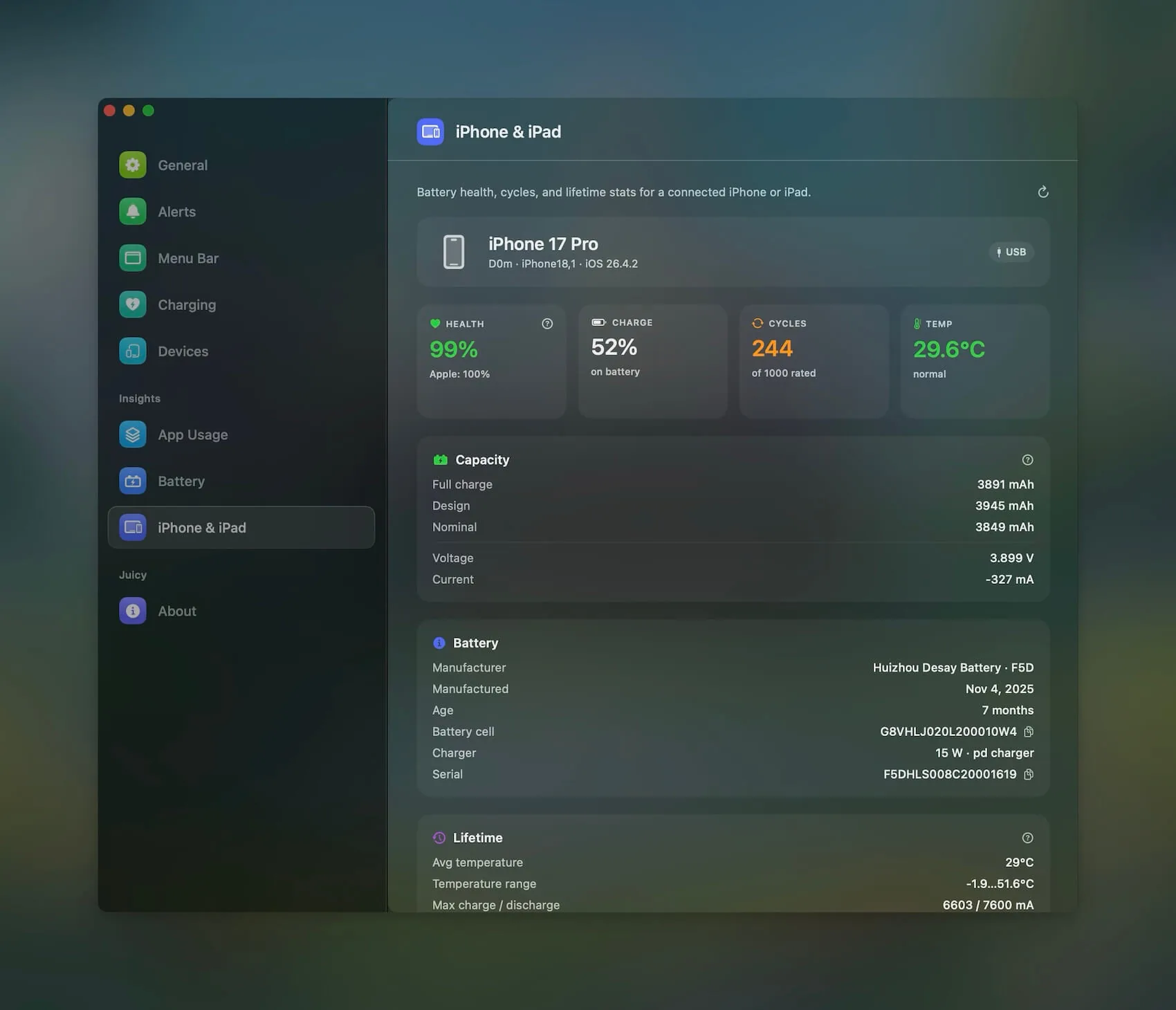
Because Juicy tracks the trend over time, "is 85 percent bad?" stops being a guess. You see whether that 85 arrived after two normal years or after six abused months, which is the difference between keeping the battery and replacing it. It is a native menu-bar app, featured by Apple, 4.85 stars, with a free 3-day trial and no credit card.
If you just want a fast verdict on the number you already have, our free iPhone battery health checker grades your capacity and cycle count in the browser and estimates how much life is left. Once you know your number is healthy, taking care of your iPhone battery keeps it that way.
Frequently asked questions
What battery capacity should I replace my iPhone at?
At or below 80 percent is the usual line. That is where Apple calls the battery consumed, where a full day stops fitting one charge, and where AppleCare+ covers a free swap. Between 80 and 85 percent it is a judgment call based on whether the runtime still serves you.
Is 85 percent battery capacity good for iPhone?
Yes. 85 percent is normal, healthy wear, typical after a year or two of daily use. You will notice slightly shorter runtime than new, but nothing that calls for a replacement. Keep the battery you have and revisit the question if it dips under 80 percent.
What is the lowest iPhone battery capacity?
There is no hard floor. Maximum Capacity keeps sliding down as the battery ages, and people see numbers in the 70s, 60s, and lower on old phones. Below about 80 percent, though, expect noticeably shorter days and possible performance throttling, which is the practical reason to replace it.
What does Maximum Capacity mean on iPhone?
It is your battery's current charge capacity compared to when it was new, shown as a percentage. 100 percent means full original capacity, 85 percent means the battery holds 85 percent of what it once did, so a charge that lasted 10 hours now lasts closer to eight and a half.