Does AppleCare Cover Battery Replacement? The 80% Rule
Jul 20, 2026 • 6 min read By Dominik, maker of JuicyAppleCare+ covers a free battery replacement only when your battery holds less than 80 percent of its original capacity. Normal wear above 80 percent is not covered, and the standard one-year warranty follows the same rule. So the deciding factor is one number: your exact battery health, which you can check for free.
Accurate to Apple's AppleCare terms as of July 2026. Coverage details can vary by region.
That 80 percent line is the entire story, and it trips people up constantly. Someone books a Genius Bar appointment expecting a free swap, then learns their battery is at 82 percent and pays full price. Here is how coverage actually works, and how to know which side of the line you are on before you go.
AppleCare vs AppleCare+ vs no coverage
The three situations behave differently, so find yours first:
- Standard warranty (first year, no AppleCare). Every Apple device includes a one-year limited warranty. It covers a battery that drops below 80 percent capacity within that first year, which is rare from normal use but does happen with defects.
- AppleCare+. Extends that same 80 percent coverage for the life of the plan, typically two or three years, and adds accidental damage coverage with a per-incident fee. Battery service under the 80 percent rule stays free.
- No coverage (expired or never purchased). You pay the out-of-warranty price. For a Mac that is roughly $129 to $249 depending on model; for most iPhones, around $89 to $99.
The key point: AppleCare+ does not give you a free battery on demand. It removes the cost only once the battery has genuinely worn past the threshold.
Mac, iPhone, and iPad all use the same 80 percent rule
Apple applies one consistent standard across the lineup. Whether it is a MacBook, an iPhone, or an iPad, the battery qualifies for warranty or AppleCare+ replacement once Maximum Capacity falls below 80 percent of original. On an iPad the number is hidden on most models, so use how to check iPad battery health to find it before you decide.
What differs is only the out-of-warranty price if you do not qualify:
| Device | Free with AppleCare+ (under 80%) | Out-of-warranty price |
|---|---|---|
| MacBook Air / Pro | yes | around $129 to $249 |
| iPhone | yes | around $89 to $99 |
| iPad | yes | around $99 to $179 |
There is one wrinkle worth knowing. macOS and iOS both round and average the capacity reading, so a device sitting right at 80 or 81 percent can read either side of the line on different days. If you are that close, it is worth confirming before you make the trip.
Why Apple might turn down a free battery
Even with AppleCare+, a few things put you back on the paying side:
- Capacity above 80 percent. The most common reason. A battery at 82 percent still works well by Apple's measure, so the wear is not covered no matter how short the runtime feels. Runtime drops long before capacity crosses the line, which is why the two often disagree. See how long a Mac battery should last for what is normal at each age.
- Accidental damage. A swollen or physically damaged battery counts as accidental damage, not wear, so it carries the per-incident AppleCare+ fee rather than being free.
- Prior third-party repairs. A battery or logic-board repair done outside Apple's network can void coverage, since Apple cannot vouch for non-genuine parts.
- Expired coverage. AppleCare+ has a term. Once it lapses, you pay the out-of-warranty price regardless of capacity.
The pattern is the same either way: the 80 percent reading decides most cases, so it is the number to confirm before you commit to a trip.
How to check if you qualify before you go
Reading your capacity takes under a minute, and it is the same number Apple's technician will look at.
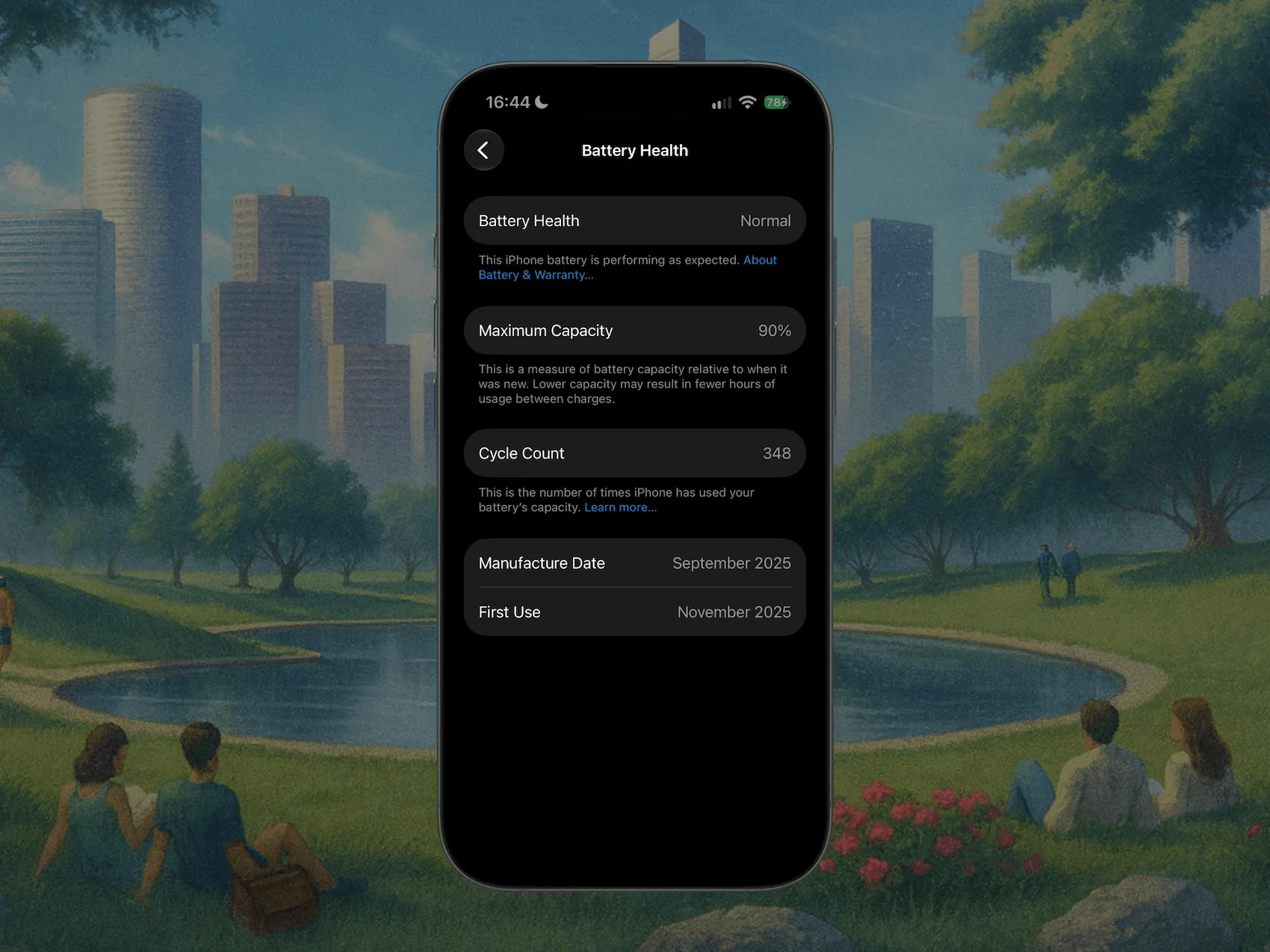
On iPhone or iPad:
- Open Settings.
- Tap Battery, then Battery Health (or Battery Health & Charging).
- Read Maximum Capacity. Below 80 percent means you likely qualify.
On a Mac:
- Hold the Option key and click the Apple menu.
- Choose System Information, then select Power.
- Read Maximum Capacity under Health Information.

Our full walkthroughs live in how to check battery health on a Mac and, for the cycles side of the story, how to check cycle count. If your Mac already shows Service Recommended, you are almost certainly under 80 percent and covered.
What it costs if you are not covered
If you land above 80 percent, or your AppleCare+ has expired, you are paying out of pocket. That is not necessarily bad news, since a battery replacement is far cheaper than a new device and restores full runtime. We break down the model-by-model pricing, plus Apple versus third-party options, in Mac battery replacement cost. Our free MacBook battery replacement cost calculator gives the number for your exact model and AppleCare status.
Third-party shops replace batteries for less than Apple, though that route ends any remaining Apple warranty on the device. And if you are sitting just above the 80 percent line, it can be worth waiting a few weeks until you clearly cross it, so the same replacement becomes free under AppleCare+ instead of a bill.
Check your exact health with Juicy first
Since coverage hinges entirely on that one percentage, it helps to know it precisely, not roughly. iOS and macOS show a single averaged number with no history, so a device hovering near the line is genuinely hard to read.
Juicy shows your exact battery health percentage and cycle count in the Mac menu bar, tracked over time so you can see the trend heading toward 80 percent instead of guessing. Plug an iPhone or iPad into your Mac and it reads their real capacity too (in the direct download and Setapp versions), which is handy since those numbers decide whether the trip to Apple is free. Featured by Apple on the Mac App Store, 4.85 stars, free 3-day trial.
Know your number before you book. It is the difference between walking out with a free battery and walking out with a bill.
Frequently asked questions
Does AppleCare cover a battery below 80 percent?
Yes. Once your battery holds less than 80 percent of its original capacity, AppleCare+ (and the standard warranty within its first year) covers a free replacement. Above 80 percent, Apple treats the wear as normal and you pay out of pocket. The 80 percent line is the whole test.
Is iPhone battery replacement free with AppleCare?
Only if the battery is below 80 percent capacity. With AppleCare+, a battery that has degraded past that line is replaced at no charge. If it is still above 80 percent, Apple charges the standard out-of-warranty fee, roughly $89 to $99 for most iPhone models.
What battery health qualifies for an AppleCare replacement?
Anything under 80 percent of original capacity. On iPhone and iPad you read this as Maximum Capacity in Settings > Battery; on a Mac it is Maximum Capacity in System Information. At 80 percent or above, Apple considers the battery healthy and coverage does not apply.
Does AppleCare+ replace a battery for free?
Yes, when capacity has dropped below 80 percent of original. AppleCare+ includes battery service at no cost once you cross that threshold, on Mac, iPhone, and iPad. It will not top up a battery that is merely aging normally, so confirm your exact health percentage before you book.